Guide: Payment Statements
Payment Statements can be accessed by navigating to https://connect.globetax.com/reports/payment-statements.
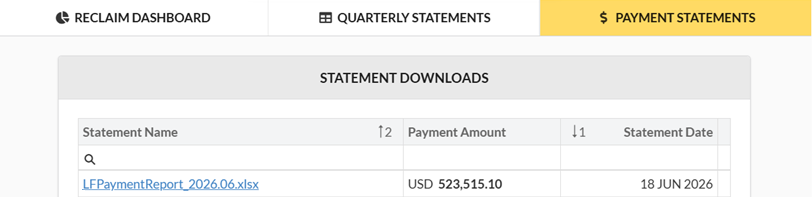
Clicking on the Statement Name will download the Excel file:
Field Guide
The following fields are included on the report:
| 1 | FINANCIAL INSTITUTION | The financial institution where the dividend was received |
| 2 | BENEFICIAL OWNER LEGAL NAME | The end-recipient of cross-border investment income and associated tax entitlements |
| 3 | BENEFICIAL OWNER CODE | GlobeTax’s internal identifier of the unique beneficial owner |
| 4 | GROUP CODE | Identifier used to group beneficial owner accounts together, representing a specific client relationship |
| 5 | ACCOUNT | The account number associated with the financial institution |
| 6 | SECURITY NUMBER | The security identifier (CUSIP, ISIN, or SEDOL) for the event |
| 7 | TRANSACTION | The unique identifier for the income payment |
| 8 | ITEM CODE | GlobeTax’s internal identifier for the item |
| 9 | SECURITY NAME | |
| 10 | PAYABLE DATE | Event Pay Date in MM/DD/YYYY format |
| 11 | COUNTRY | Country of Issuance for the security |
| 12 | CURRENCY | Currency applicable to the Gross, Net, Tax Withholding, Reclaim Amount (CCY), and Market Fee |
| 13 | SHARES | The number of shares on which the reclaim is paid. Valid data: whole numbers |
| 14 | DIVIDEND RATE | Dollar amount paid per share |
| 15 | GROSS DIVIDEND | Gross dividend amount paid by the issuer to the beneficial owner |
| 16 | NET DIVIDEND | Net Dividend amount paid by the issuer to the beneficial owner after tax has been withheld |
| 17 | TAX WITHHOLDING | Tax amount withheld by the issuer or issuer’s agent upon payment of the dividend |
| 18 | TAX WITHHOLDING RATE | Percentage of tax withheld from Gross Dividend |
| 19 | OMNIBUS ACCOUNT | |
| 20 | APPLICATION | GlobeTax’s internal identifier for the application the item is part of |
| 21 | RECLAIM AMOUNT (CCY) | Reclaim amount in local currency |
| 22 | MARKET FEE | |
| 23 | PAYMENT CURRENCY | |
| 24 | FX RATE | |
| 25 | RECLAIM AMOUNT (LOCAL) | |
| 26 | DEPOSITARY FEE | |
| 27 | MISCELLANEOUS FEE | |
| 28 | FOREIGN FEE | |
| 29 | ACCOUNT FEE | |
| 30 | GLOBETAX FEE DEDUCTED | |
| 31 | NET RECLAIM | |
| 32 | GLOBETAX FEE INVOICED | |
| 33 | FOREIGN FEE (PREPAID) | |
| 34 | ISIN | |
| 35 | PAYMENT METHOD | |
| 36 | BANK NAME | |
| 37 | BANK ACCOUNT |
FAQ
Why would there be multiple lines for the same event?
When filing a reclaim for a transparent entity, such as a partnership or trust, the reclaims often have to be filed at the partner or beneficiary level. We provide the details at the beneficial owner level.
How do I change payment details?
Please contact us to modify wire or bank instructions https://globetax.atlassian.net/servicedesk/customer/portal/15
How did we come to this figure (or something along these lines),
When the TA will issue funds to GlobeTax, we deduct our fee, and any depositary fees, and wire the net payment to the financial institution. In a limited number of markets, the financial institution will be paid directly, and GlobeTax will invoice for our fee.
I have already received a payment for this event, and the reclaim amount differs from the current amount.
This could stem from our team receiving documentation for additional investors, or shares that could be filed at the exempt rate, effectively allowing us to file for additional entitlements.
What happens if my account closes and there is an outstanding reclaim owed to me?
Since GlobeTax will not automatically know when an account has closed, unless we are notified, the payment will be send to the account on file. In most cases the FI will utilize the standing instructions to wire the funds to the new account. We do encourage clients to notify us when accounts close so we can send the proceeds directly to the appropriate account.